
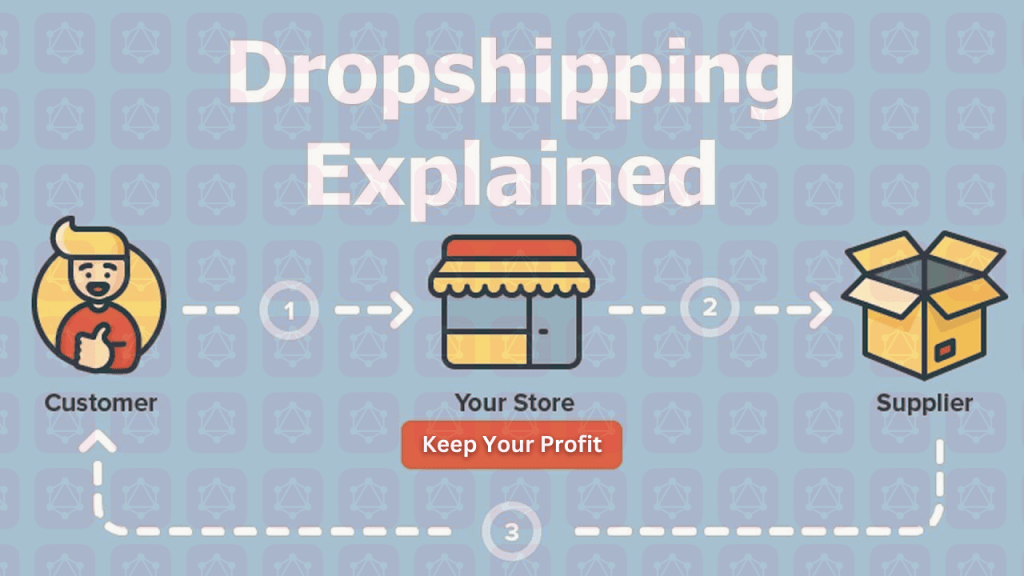
Dropshipping is an excellent way to enter an e-commerce marketplace. You never need to carry or store your products in dropshipping or waste time in inventories. Instead, you can save valuable time and focus on growing your e-commerce store and making sales. Dropshipping is a flexible method to mold your business toward success. And dropshipping on a profitable platform like Shopify is a golden ticket for new e-commerce store holders.
So, in this blog, we will see how Shopify dropshipping actually works, and we will take you through the steps and benefits of dropshipping on Shopify.
To begin with, let us see,
What is Dropshipping?
Dropshipping is a business prototype in which e-commerce business owners don’t need to carry the stock or inventories. In other words, the store will deliver the orders without storing the products in any warehouse.
We can understand the process by a simple example. In traditional business, when a store holder receives an order from a client, the client contacts the owner, and the owner delivers the order by suppliers to the customer’s doorstep. On the other hand, you don’t need to do all this in dropshipping. Instead, you will act just like a middleman.
Dropshipping is the perfect step if you are new to an e-commerce business. The process is easy to function and manage. Moreover, you would only need a small investment. Above all, you don’t need to put back your regular job. Instead, you can carry dropshipping business part-time along with your job.
How Does Shopify Dropshipping Work?
In simple words, dropshipping is a mutual relationship between a customer-centered e-commerce store and a supplier. You can take two approaches to drop ship products on a reputable platform like Shopify. Firstly, you can directly choose a supplier to work with anywhere around the globe. In the other option, you can select a Shopify app to connect with innumerable suppliers.
So, when you have any order from a client, you can ship it through a direct supplier or Shopify app according to your choice and ease.
Now, if you all gear up to start dropshipping on Shopify, let’s see the essential steps to take:
Steps to Start Dropshipping on Shopify
There are several steps you need to take in order to create your e-commerce store and start dropshipping. So let’s dig into the details of each step:
1. Choose the Name of Your Store
This is the first and primary step to creating your Shopify dropshipping account. The name of a brand or store acts as an identity for that store. Therefore it is essential to name your store wisely. Here are some tips to consider while naming your store:
- It should be simple.
- The more creative the store name, the more the audience will be attracted to your store.
- It should be pretty easy to remember.
However, Shopify makes your brand’s naming easy for you. You can brainstorm creative names for your e-commerce store through the Shopify business name generator. For this purpose, you need to go to the official site of the Shopify business name generator and enter the keyword/ or the word you want to be in the name and press the “generate names” option.
You will get a list of business names in no time. Thus, you choose the best-sounding word for your dropshipping store. This way, Shopify proves to be time- and cost-effective as the name generator is free. Once you have selected your perfect name, you need to pass it through google searches to see its availability for a domain name.
2. Create a Shopify Account
The next step is to create a Shopify account. Creating a Shopify account is not an uphill climb. Instead, it is really an effortless and quick process. To begin with, you visit the homepage of the official site of Shopify and click on “free trial.”
After that, enter your email address and create a strong password. Then, in the bottom bar, they will ask for your store’s name, so enter the name you have decided on. Then it would be best to fill up some things related to your experience with Shopify, and you will be all set.
3. Optimize the Settings
In this step, you must go through the settings section of your newly created Shopify account. Optimizing the settings allows you to set payment methods, create your store’s policies, and set your shipping rates.
4. Launching Your Dropshipping Store
Once you have optimized the settings, you’re all set to launch your dropshipping store. So for this purpose, open the Shopify admin dashboard and go to the “sales channel” tab on the menu. Here you will see the option of “add an online store” click on it, and that’s all. So now, by this step, you have an actual running online store on Shopify.
5. Design Your Store
Now that you have your own online store, it’s time to design it and attract visitors’ attention. For this step, you should first set a theme for your store. Then, you can choose the themes from the Shopify theme store. There is a wide range of themes of Shopify, available in free as well as paid options.
After that, you should create a logo for your store. Shopify has its own logo maker, and you can use it to create a free online logo.
6. Dropship the Products
Now is the time you have been waiting for too long. Your store is all set up, settings are optimized, and the store is well-designed with themes and logos. Now you should start dropshipping the products on Shopify.
To start the process, you must add some products and start selling. Then, you can use Shopify’s DSers app to add products to your store. After downloading and making an account on the app, you can easily import the products to your Shopify store.
Now start selling and earning!
Conclusion
Dropshipping is an excellent way to generate high revenue these days. It’s not a full-time duty, and you don’t have to carry the burden of any inventory. Moreover, there will be no massive investment at stake. So why not give it a try?

 QL Help